Showing posts with label Duos. Show all posts

Saturday, April 25, 2015

Tagged under: , , , , , , , , ,

EMINENCE UI | Galaxy young GT-S6312 | MOD


Hello Every one i'm back with a new UI MOD for Samsung Galaxy young Duos this one is Called
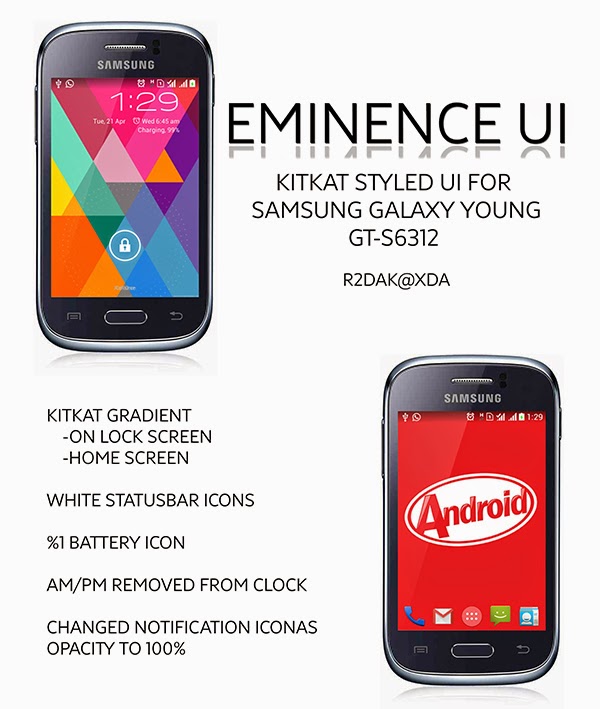

Eminence UI
Eminence UI


FEATURES:
-x-Kitkat Gradient
-Lock Screen
-Homw Screen
-x- Status bar icons themed to White
-x- %1 Kitkat Battery Icon
-x- Notification icons opacity changed to 100%
- AM/PM Removed from Clock
-x- Kitkat Tiles
-x- SIM Switcher moved to a Tile
-x- Live Battery And Wifi Tiles
-x- Working Flash
-Tiny FlashLight Required to use it
-x- Themed Lidroid Toggles
-New Icons
- Toggle Text Removed
-x- Clear Notification Moved to top

BUGS
-x- sometime gives FC when you tap on wifi or battery live tile
-x- let me know if you found any

Tips
the colour of Status bar on lock-screen can be changed to full transparent (looks really beautiful ) use gravity box to add transparency

WHAT YOU NEED:
-x- A Rooted Galaxy Young Duos GT-S6312
-x- Stock Deodexed Rom
-x- ClockworkMod Recovery (CWM)

INSTALLATION:
-x- Download the EMINENCE_UI.zip from Attachment and place it into your SD card.
-x- Reboot into RECOVERY (CWM OR TWRP) (Volume up+ Home + Power).
-x- select EMINENCE_UI.zip From SD Card >Choose YES- Install EMINENCE_UI.zip
-x- Reboot
Enjoy

Sunday, March 30, 2014

Tagged under: , , , ,

Modern Combat 2 Black Pegasus HD


Complete the mission unveiled in the first opus of one of the most acclaimed FPS games on Android, this time on fronts all over the globe. Modern Combat 2: Black Pegasus further improves the exemplary gameplay of the first Modern Combat game for an astounding immersion in a modern war experience.
An improbably realistic shooter with magnificent graphics! As an American infantryman, you receive a task to capture the terrorist. Pass through 12 interesting missions in various corners of the Earth. In the game there’re 15 types of weapon. There is also a multiplayer (4 various modes) with possibility of game up to 10 people at the same time.


Download


Torrent

Thursday, March 20, 2014

Tagged under: , , ,

SOULCALIBUR APK+DATA


SOULCALIBUR is the ultimate in 3D fighting games!
Relive the eternal tale of swords and souls transcending time and space.


The series first appeared in arcades in 1998. By the following year it had been ported to home video game consoles. Now the highly acclaimed “SOULCALIBUR” series is available on Google Play. Enjoy the memorable characters and non-stop action that SOULCALIBUR is renowned for with complete arcade fidelity in the comfort of your own home!


This game uses Google Play Game Service for achievements and leaderboards.
Diverse set of game mode


  ARCADE BATTLE
 The original battle mode from the arcade version “SOULCALIBUR”.
 Defeat all enemies and make it to the end.

TIME ATTACK
 How fast can you beat the game?

  SURVIVAL
With only a limited amount of life, how many opponents can you defeat?

  EXTRA SURVIVAL
  How many opponents can you defeat without taking any damage?

  MUSEUM
  Enjoy viewing a variety of artwork

  PRACTICE
 Grasp the game’s basics and perfect your technique.


Fame Features
  19 character roster!
- All character moves faithfully recreated!
- A new virtual game pad that has been fine-tuned specifically for fighting games.
  The button layout is just as you remember it!


 Requires 200MB of free space to download.

DOWNLOAD


TORRENT
 

Friday, February 7, 2014

Tagged under: , , , , ,

Flappy Bird: This ugly little bird has ruined my life

Flappy Bird: This ugly little bird has ruined my life


Download this game and you will be driven to one or a combo of following: 
  • Smashing your device between your teeth, throwing your device at a wall or nearby living organism, 
  • Running your device over with an 18 wheeler Mack truck,
  •  Feeding your device to the sharks in a nearby aquatic facility or their natural habitat, 
  • Or casting a spell upon your device which will permanently banish it to the pits of Hades.


Seriously This game, it takes over your life. Not in the sense that when you're bored you play the game; it's more in the sense that it consumes your every thought process and desire. You know you can do better so you keep playing and keep playing, until you've realize that several hours have passed by. You start skipping class, work, and even lose sleep because it's all you think about. Flappy bird consumes your life.
and the worse thing about this game is its Size only 894kb so much evil packed into 894kb,
 try it yourself 
But remember 

You have been warned


Friday, January 31, 2014

Tagged under: , , , , , , , ,

ClockworkMod Recovery For Galaxy Young GT-S6312


This post will guide you on How to  Install ClockworkMod (CWM) Recovery on Samsung Galaxy Young GT-S6312 also working for GT-S6310 ,You will need a Rooted Samsung galaxy young for installing CWM,

Don't know how to root your Samsung Galaxy Young don't worry i got you covered click here

So some of you guys must be  wondering what the hell is this ClockworkMod,
This guy has Explained every thing you need to know about ClockworkMod


this guide is tested by me and its 100% working,So now Lets Get going

NOTE: PLEASE FOLLOW THIS GUIDE STEP BY STEP
  1. Download the Recovery+Rooting package from the link at the end of this post

  2. extract the package via 7-zip or winrar.

  3. then copy the CWM.img, cwm.sh, and Terminal Emulator_1.0.49 to the internal memory of the phone using a data cable or Bluetooth (don't worry about the other files we don't need them in this tutorial )

  4. Make Sure you have enable the permission to install the apps from the sources other than Google Play. Go to Menu>Settings>Security> and check Unknown Sources.

  5. Now, go to the internal memory e through File Manager, and then run Terminal Emulator_1.0.49 to install the Terminal app. in a few seconds a prompt will tell about successful installation of the App.

  6. Open Terminal App and type following commands:
Code:
su
cd /storage/sdcard0
sh cwm.sh
 Close Terminal app
Thats it ClockworkMod Recovery is installed now 

How to Enter ClockworkMod Recovery!!

1. Switch off the Phone completely.
2. Press & Hold Volume Up + Home + Power Key.

Touchscreen does not work on ClockworkMod Recovery so
Use UP & DOWN key to navigate items & Power key to Selection.


Still sure how to do it
why dont you watch this video

Sunday, January 26, 2014

Tagged under: , , , , , ,

[HOW TO] Root Samsung Galaxy Young GT-S6310/GT-S6312


Root Samsung Galaxy Young GT-S6310/GT-S6312

this is a Step by Step Guide on how to Rooting Samsung galaxy young,tested by me and its 100% working

Steps to Root Samsung Galaxy Young GT-S6310/GT-S6312


  1. Download The package from below to your computer.

  2. extract the package via 7-zip or winrar.

  3. then copy the Framaroot-1.4.2.apk and stericson.busybox.apk to the phone using a data cable or Bluetooth (don't worry about the other files we don't need them in this tutorial )

  4. Make Sure you have enable the permission to install the apps from the sources other than Google Play. Go to Menu>Settings>Security> and check Unknown Sources.

  5. Now, browse the file through File Manager, and then run Framaroot-1.4.2.apk to install the same. in a few seconds a prompt will tell about successful installation of the App.

  6. After run. Farmaroot application & Select "Install Superuser".
    (Update 30/march/2014>>Please select SuperSU from the List instead of Superuser its better)

  7. Select "Gandalf".

  8. After clicking Gandalf, wait for few minutes while process is getting finished, After the installation, just reboot the device.


well well look at you !! you have just rooted your Galaxy Young GT-S6310/S6312
YOU ARE OFFICIALLY A NERD NOW

PS:you can uninstall Framaroot after rooting as long as superSU or Superuser is installed phone will stay rooted

Installing BusyBox(Optional)

What is BusyBox?
you do not need busy box to have root.
But many root apps as well as settings in custom roms use busybox to run the scripts that make them work. so while you can root without busybox you are very limited as to what you can do with it.
so while you dont need it to have the phone rooted. its still prety much needed to take advantage of that rooting 


  • Remember that we copied the  stericson.busybox.apk,  on the third step,well this is the time to install it 
  • browse to the files through File Manager, and then run stericson.busybox.apk to install it .
  • Open Busy Box app from app drawer and install Busy Box,
  • Reboot

How to Unroot 

  • Install and then Run Framaroot 
  • Select Unroot From the list
  • click on Gandalf
  • Reboot
  • Thats It

Download

Still not sure how to do it why don't you watch this Video 

Where To Now: Well you have Rooted Galaxy Young,
How about Installing Clockworkmod Recovery to your Galaxy young 

ClockworkMod Recovery For Galaxy Young GT-S6312/6312