
Tip: its millions times better then CWM available for this device IMO you should install this one insted of CWM
Key Features :
Ability to save custom recovery settings.Touchscreen driven with real buttons and drag-to-scroll.
XML-based GUI that allows full customization of the layout – true theming!
Settings are saved to the sdcard and persist through reboots.
Ability to choose which partitions to back up and which to restore.
Ability to choose to compress backups – now with pigz (multi-core processor support for faster compression times.
And because this is v2.8.5.0, so What's new in 2.8.5.0 :
Scale the GUI - TWRP can read the theme's resolution and scale it up or down to fit the theme to your screen's resolution.
Backups can now be cancelled while the backup is in progress (does not include restore because we don't want to leave your device in a bad state).
Improve thread handling and move input handling into the main rendering thread to improve stability.
Make MTP work even if unplugged and plugged back in.
Unify scrollable list code and make kinetic scrolling feel more natural.
Fix handling of mapped zip files for OTA updates (CM12 updater).
USB keyboards should now work on all devices that support USB host mode via a USB OTG cable.
Other small fixes and improvements.
Screenshots

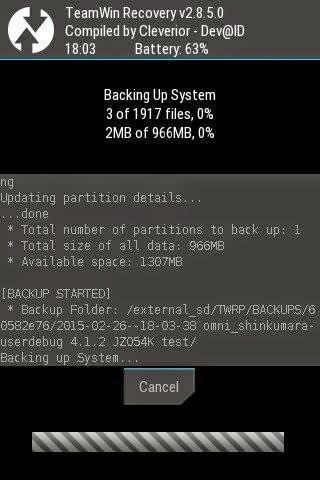


Do you wanna try ? Let's follow this tutorial..
Download TWRP_v2.8.5.0_royss_RC1.zip
Restart the phone and go to CWM by pressing Volume Up + Home + Power Key.
Install zip -> Search TWRP_v2.8.5.0_royss_RC1.zip
Wait until the installation is complete and reboot.
But if you have not installed CWM in your device, follow this tutorial..
Install zip -> Search TWRP_v2.8.5.0_royss_RC1.zip
Wait until the installation is complete and reboot.
But if you have not installed CWM in your device, follow this tutorial..
(you need PC/Laptop and odin to do this)
Download TWRP_v2.8.5.0_royss_RC1.tar.md5
Open Odin.
Reboot phone in Download Mode (press and hold Home + Power + Volume
Down buttons).
Connect phone and wait until you get a blue sign in Odin.
Insert TWRP_v2.8.5.0_royss_RC1.tar.md5 to PDA.
Insert TWRP_v2.8.5.0_royss_RC1.tar.md5 to PDA.
Make sure re-partition is NOT ticked.
Click the start button, sit back and wait a few minutes.
Wait until the flashing process is complete.
If the recovery mode changed to be like these screenshots, then you have successfully installed TWRP.
Bug :
Can't set brightness
Lemme know if you find another...
Original post
Bug :
Can't set brightness
Lemme know if you find another...
Original post
DO WITH YOUR OWN RISK !!!


